# MS Viva Engage Agent

<table data-card-size="large" data-column-title-hidden data-view="cards"><thead><tr><th></th><th></th><th data-hidden data-card-cover data-type="image">Cover image</th></tr></thead><tbody><tr><td><strong>Overview</strong></td><td><ul><li>Search and retrieve posts, discussions, and community content from Viva Engage through Blockbrain</li><li>Browse and analyze conversations across all accessible communities</li><li>Monitor personalized feeds and track organizational communications</li><li>Discover users, experts, and networking opportunities within communities</li><li>Extract and summarize discussion content for knowledge discovery and trend analysis</li></ul></td><td><a href="/files/ikR2AL5octrVSvEocI7Z">/files/ikR2AL5octrVSvEocI7Z</a></td></tr><tr><td><strong>Prerequisites</strong></td><td><ul><li>Complete the <a href="https://docs.en.theblockbrain.ai/for-users/agents">general setup steps</a> from the main AI Agents page</li><li>Ensure users have active Microsoft Viva Engage licenses and community access</li><li>Verify appropriate Microsoft 365 licensing for Viva Engage and related services</li><li>Confirm users are members of relevant communities they need to access</li></ul></td><td><a href="/files/X7MpGP1nVARHAWPFype1">/files/X7MpGP1nVARHAWPFype1</a></td></tr></tbody></table>

### Azure App Registration Configuration

#### Required API Permissions

Add the following Microsoft Graph permissions to your app registration:

<table><thead><tr><th width="371.671875">Permission</th><th>Type</th><th>Description</th></tr></thead><tbody><tr><td><code>offline_access</code></td><td>Delegated</td><td>Maintain access to data you have given it access to</td></tr><tr><td><code>openid</code></td><td>Delegated</td><td>Sign users in and read basic user profile information</td></tr><tr><td><a href="https://api.yammer.com/user_impersonation

"><code><https://api.yammer.com/user_impersonation></code></a></td><td>Delegated</td><td>Access Viva Engage communities, posts, and user data on behalf of the signed-in user</td></tr></tbody></table>

#### Permission Configuration Steps

1. In your Azure app registration, go to **API permissions**
2. Click **"Add a permission"** > **APIs my organization uses**
3. Search for and select **"Yammer"** or **"Microsoft Viva Engage"**
4. Select **Delegated permissions**
5. Search for and select **"user\_impersonation"**
6. Click **"Add permissions"**
7. Click **"Grant admin consent"** (recommended for organization-wide deployment)

{% hint style="info" %}
**Note**: Viva Engage uses the Yammer API endpoint (`https://api.yammer.com/user_impersonation`) rather than Microsoft Graph permissions. This permission allows the application to access Viva Engage on behalf of the signed-in user.
{% endhint %}

### Agent Configuration in Blockbrain

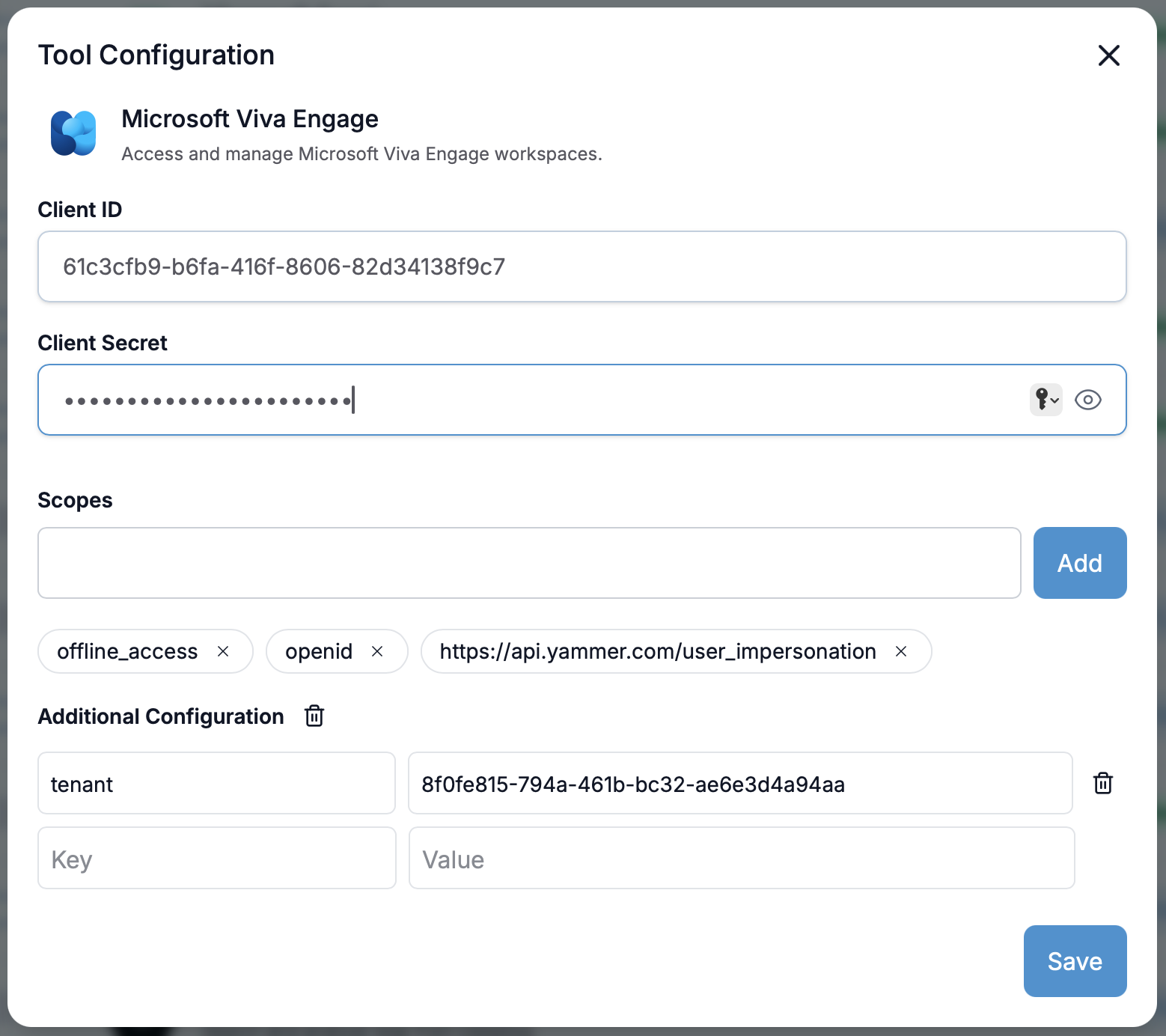
<figure><img src="/files/9GEVTrp6Mn843WTsOHKC" alt=""><figcaption></figcaption></figure>

<figure><img src="/files/zUjJVFeWfKlIO6Hh9tJD" alt=""><figcaption></figcaption></figure>

#### Configuration Steps

1. **Access Agent Settings**:
   * Navigate to your Blockbrain admin panel
   * Go to **Agents** > **MS Viva Engage Agent**
   * Click **"Configure"**
2. **Enter Azure Credentials**:
   * **Client ID**: Enter the Application ID from your Azure app registration
   * **Client Secret**: Paste the client secret you generated (use the eye icon to toggle visibility)
   * **Tenant**: Enter your Azure tenant ID
3. **Configure OAuth Scopes**:
   * Add each required scope individually using the **"Add"** button as mentioned [here](#required-api-permissions)
   * Each scope appears as a removable tag with visual indicators
   * Use the **"X"** button to remove any incorrect scopes
4. **Additional Configuration** (Optional):
   * Configure custom key-value pairs for specific organizational requirements
   * Set up any specialized email handling rules
5. **Save Configuration**:
   * Click **"Save"** to apply all settings
   * Wait for the confirmation message

### Alternative: Admin Consent Configuration

For streamlined deployment with pre-approved permissions:

1. In Azure, grant admin consent for all required Viva Engage permissions
2. In Blockbrain configuration, use `.default` scope instead of individual scopes
3. This approach simplifies user onboarding by eliminating individual consent prompts

### Testing the MS Viva Engage Agent

#### Verification Steps

1. **Authentication Test**:
   * Use Blockbrain's built-in connection testing tool
   * Verify successful OAuth flow with Viva Engage API
2. **Community Access**:
   * Test listing available communities
   * Verify community membership and permissions
   * Check access to both public and private communities
3. **Post Search & Discovery**:
   * Search for posts using keywords
   * Verify post content retrieval
   * Test feed access and filtering
4. **User Information**:
   * Retrieve user profile information
   * Verify user listing within communities
   * Check networking and expertise discovery

### Common Viva Engage Integration Use Cases

#### Community Management

* **Discussion Analysis**: AI-powered analysis of community conversations
* **Content Discovery**: Find relevant posts and discussions across communities
* **Engagement Tracking**: Monitor community activity and participation levels

#### Knowledge Extraction

* **Best Practices Mining**: Extract proven methods and successful approaches from discussions
* **Decision Tracking**: Identify and summarize key organizational decisions
* **Expertise Mapping**: Discover subject matter experts and thought leaders

#### Community Monitoring

* **Feed Analysis**: Monitor personalized feeds for important updates
* **Trend Identification**: Spot emerging topics and recurring themes
* **Organizational Updates**: Track company announcements and policy changes

### Troubleshooting

#### Authentication Issues

**Problem**: OAuth authentication failures

* **Solution**: Verify the redirect URL is exactly `https://nango.theblockbrain.ai/oauth/callback`
* **Check**: Ensure admin consent is granted for Viva Engage user impersonation
* **Verify**: Client secret hasn't expired and is correctly entered

#### Community Permission Errors

**Problem**: Cannot access communities or posts

* **Solution**: Confirm user has active Viva Engage license and community access
* **Check**: Verify the user is a member of the communities they're trying to access
* **Validate**: Test with a different user account to isolate permission issues

#### Post Search Issues

**Problem**: Search returns no results or limited content

* **Solution**: Ensure user has permission to view the communities containing relevant posts
* **Check**: Verify search terms are appropriate and not too specific
* **Test**: Try broader keyword searches to confirm search functionality

#### Scope Configuration Problems

**Problem**: Scopes not being saved or recognized

* **Solution**: Add each scope individually using the interface
* **Check**: Remove any duplicate or malformed scopes
* **Verify**: Ensure all required scopes are present in the configuration

### Security and Compliance

#### Data Protection

* **Community Security**: All Viva Engage community data is handled according to Blockbrain's security policies
* **Post Privacy**: Community access respects user privacy settings and community permissions
* **Discussion Confidentiality**: Post and comment data is processed with appropriate confidentiality measures

#### Compliance Considerations

* **GDPR Compliance**: Viva Engage post and community data processing follows GDPR requirements
* **Data Retention**: Configure appropriate data retention policies for community posts and user interactions
* **Audit Logging**: All Viva Engage agent activities are logged for compliance reporting

#### Access Control

* **User Permissions**: Agent inherits the authenticated user's Viva Engage community permissions
* **Community Access**: Respects private and public community access restrictions
* **Security Groups**: Can be configured to work with Azure AD security groups and community membership

### Performance Optimization

#### Post Processing

* **Batch Operations**: Configure batch processing for large post search and analysis operations
* **Rate Limiting**: Respect Microsoft Graph API rate limits for Viva Engage
* **Caching**: Implement appropriate caching for frequently accessed community data

#### Community Efficiency

* **Search Frequency**: Configure optimal search intervals for community monitoring
* **Content Filtering**: Set up filters to process only relevant posts and discussions
* **Timeline Handling**: Ensure proper timestamp handling for post chronology and feed management

### Next Steps

After successful MS Viva Engage Agent configuration:

* **User Training**: Provide training on community search and discussion analysis AI features
* **Integration Setup**: Configure integration with existing collaboration workflows
* **Monitoring**: Set up monitoring for agent performance and community engagement insights

### Support and Resources

For assistance with MS Viva Engage Agent configuration:

* **Blockbrain Support**: Contact your Customer Success Manager for feature-specific help
* **Microsoft Documentation**: Reference Microsoft Graph API documentation for detailed permission information
* **Azure AD Troubleshooting**: Use Azure AD sign-in logs for authentication diagnostics


---

# Agent Instructions: Querying This Documentation

If you need additional information that is not directly available in this page, you can query the documentation dynamically by asking a question.

Perform an HTTP GET request on the current page URL with the `ask` query parameter:

```
GET https://docs.blockbrain.ai/for-admins/agents/ms-viva-engage-agent.md?ask=<question>
```

The question should be specific, self-contained, and written in natural language.
The response will contain a direct answer to the question and relevant excerpts and sources from the documentation.

Use this mechanism when the answer is not explicitly present in the current page, you need clarification or additional context, or you want to retrieve related documentation sections.