# SAP C4C Agent

<table data-card-size="large" data-view="cards"><thead><tr><th></th><th></th><th data-hidden data-card-cover data-type="image">Cover image</th></tr></thead><tbody><tr><td><strong>Overview</strong></td><td><ul><li>Search and browse SAP C4C entities, records, and fields through Blockbrain</li><li>Create and update records across any queryable or writable C4C OData entity (Accounts, Contacts, Leads, Opportunities, Activities, Service Requests/Tickets, and customer-specific extension entities)</li><li>Automatically resolve standard and custom OData collection names from plain-language descriptions using the C4C <code>$metadata</code> document</li><li>List, filter, and analyze CRM and service records by status, owner, date, account, or any available field</li><li>Support for both standard SAP C4C entities and customer-extended (KUT / SDK) entities</li></ul></td><td><a href="/files/ikR2AL5octrVSvEocI7Z">/files/ikR2AL5octrVSvEocI7Z</a></td></tr><tr><td><strong>Prerequisites</strong></td><td><ul><li>Complete the general setup steps from the main <a href="https://docs.en.theblockbrain.ai/for-admins/agents">AI Agents</a> page</li><li>Ensure users have active SAP C4C accounts with the relevant business role and access-restriction context</li><li>Verify your C4C tenant exposes the standard OData endpoint (<code>/sap/c4c/odata/v1/c4codataapi/</code>) and that OAuth 2.0 is enabled</li><li>A C4C administrator with permission to register OAuth 2.0 Clients via <strong>Application and User Management</strong> → <strong>OAuth 2.0 Client Registration</strong></li></ul></td><td><a href="/files/X7MpGP1nVARHAWPFype1">/files/X7MpGP1nVARHAWPFype1</a></td></tr></tbody></table>

#### How SAP Authentication Differs from Other Agents

> **SAP is not a browser-redirect OAuth.** Every other Blockbrain agent (Salesforce, Outlook, Google, Atlassian, …) uses **OAuth 2.0 Authorization Code** — the user clicks **Connect**, gets redirected to the vendor's login page through `https://nango.theblockbrain.ai/oauth/callback`, consents, and is redirected back with an access token.&#x20;
>
> **SAP integrations work differently:** there is **no browser redirect, no consent screen, and no callback URL is required on the SAP side.** Instead, a SAP administrator pre-issues credentials in the SAP tenant, and those credentials are pasted into the Blockbrain Connect UI once. The agent then authenticates server-to-server.

The SAP C4C Agent supports two non-interactive authentication flows. Pick the one your SAP C4C tenant is configured for:

| Flow                                                 | When to use                                                                                                                                                                         | What the user provides                                                                                                                                      |
| ---------------------------------------------------- | ----------------------------------------------------------------------------------------------------------------------------------------------------------------------------------- | ----------------------------------------------------------------------------------------------------------------------------------------------------------- |
| **OAuth 2.0 — Client Credentials** *(default)*       | Most production C4C integrations. A single dedicated technical/communication user backs the connection; permissions are governed by that user's C4C business role.                  | Tenant URL, Client ID, Client Secret                                                                                                                        |
| **OAuth 2.0 — SAML 2.0 Bearer Assertion** *(opt-in)* | When your security policy mandates per-user assertion-based auth (e.g. you've issued an X.509 cert per user via an IdP and want token issuance scoped to a specific business user). | Tenant URL, Client ID, Company ID, Base64-encoded SAML 2.0 Bearer Assertion (signed locally with the X.509 private key registered against the OAuth Client) |

The configuration below assumes **OAuth 2.0 Client Credentials**, which matches the pattern used by Blockbrain's existing SAP integrations (e.g. SAP Concur). If your tenant is set up for SAML 2.0 Bearer Assertion instead, see the [SAML 2.0 Bearer Assertion (Alternative)](https://claude.ai/local_sessions/local_e458fc8c-45f4-4496-8611-a7e0ccb6a5f0#saml-20-bearer-assertion-alternative) section below.

#### SAP C4C OAuth 2.0 Client Registration

**Required OAuth Configuration**

Configure the following when registering your SAP C4C OAuth 2.0 Client:

| Setting                     | Value                                                            | Notes                                                                                                                                                                                                                                  |
| --------------------------- | ---------------------------------------------------------------- | -------------------------------------------------------------------------------------------------------------------------------------------------------------------------------------------------------------------------------------- |
| **Issue Settings → Method** | **Client Credentials**                                           | Required for the default flow. Selects OAuth 2.0 grant type `client_credentials`                                                                                                                                                       |
| **Token Lifetime**          | Default (3600 s) or per your security policy                     | Blockbrain transparently refreshes within Nango                                                                                                                                                                                        |
| **Token Endpoint**          | `https://my{tenant-id}.crm.ondemand.com/sap/bc/sec/oauth2/token` | Derived from your tenant URL — you do **not** need to enter this anywhere                                                                                                                                                              |
| **Scope**                   | *(left empty by default — see note)*                             | C4C resolves authorisations from the **business role assigned to the technical user** behind the OAuth Client, not from OAuth scope strings. `[TODO confirm]` whether Botticelli requires any explicit scope strings for the C4C tool. |
| **Binding to a User**       | A dedicated technical/communication user                         | The OAuth Client must be bound to a real C4C business user. Its business role determines what the agent can read and write                                                                                                             |

> **Scope clarification:** SAP C4C does **not** publish a fixed list of OAuth scope strings the way Salesforce does. With the **Client Credentials** flow, authorisation is delegated to the **business role and access restriction** of the technical user bound to the OAuth Client — the C4C OAuth Client itself has no scope strings beyond what the work-centre assignments of that user grant. Blockbrain therefore does **not** ask you to paste a scope list during configuration. `[TODO confirm with Blockbrain Technical PM — the Botticelli config may still expose an optional scope field for tenants that have custom scopes registered.]`

**Creating the SAP C4C OAuth 2.0 Client**

1. Log in to **SAP Cloud for Customer** as an administrator
2. Open the **Application and User Management** work centre → **OAuth 2.0 Client Registration** *(On older tenants this lives under **Administrator** → **General Settings** → **OAuth 2.0 Client Registration**.)*
3. Click **New** to create a new OAuth 2.0 Client
4. Fill in the form:
   * **Description / Client Name:** `Blockbrain`
   * **Issue Settings → Method:** **Client Credentials**
   * **Issue Settings → Token Lifetime (seconds):** leave at default unless your policy requires shorter
   * **Binding → User:** select the dedicated technical/communication user this connection should act as. *(Create one first via **Business Users** if it doesn't already exist.)* The user's **Business Role** determines what entities and fields the agent can read and write
5. **No Redirect URI is required for Client Credentials.** Leave the **Redirect URI** field empty unless your tenant explicitly enforces a value
6. Click **Save** — and note SAP's warning that the Client Secret will only be displayed once
7. Click **Show Secret** (or **Reset Secret**) and copy the generated **Client Secret** — store it securely for the next step
8. From the same screen, copy the **Client ID** (auto-generated by SAP)

> **Note on tenant URL:** Your C4C tenant URL follows the pattern `https://my{tenant-id}.crm.ondemand.com` — e.g. `https://my300001.crm.ondemand.com`. You will need this base URL during the Blockbrain configuration step; it is used both as the OData host and to derive the OAuth token endpoint.

> **Note on the redirect URL:** Because the Client Credentials flow has no browser redirect, the standard Blockbrain callback `https://nango.theblockbrain.ai/oauth/callback` is **not** required on the SAP side and you do **not** need to whitelist it in C4C.

**Retrieving your Credentials**

After saving the OAuth 2.0 Client in C4C:

1. Open the newly-created client from the **OAuth 2.0 Client Registration** list
2. Copy the **Client ID** (visible at the top of the form)
3. Click **Show Secret** to reveal the **Client Secret** — copy it immediately, as SAP only displays the secret once per generation
4. Note the **Tenant URL** (`https://my{tenant-id}.crm.ondemand.com`) — Blockbrain will derive the OAuth token endpoint (`/sap/bc/sec/oauth2/token`) from this automatically `[TODO confirm derivation logic with Botticelli config]`

> **Important:** After creating a new OAuth Client in SAP C4C, it can take **a few minutes** for the configuration to propagate. If the connection fails immediately after activation, wait briefly and try again. `[TODO confirm typical propagation window for C4C]`

#### SAP C4C Agent Configuration in Blockbrain

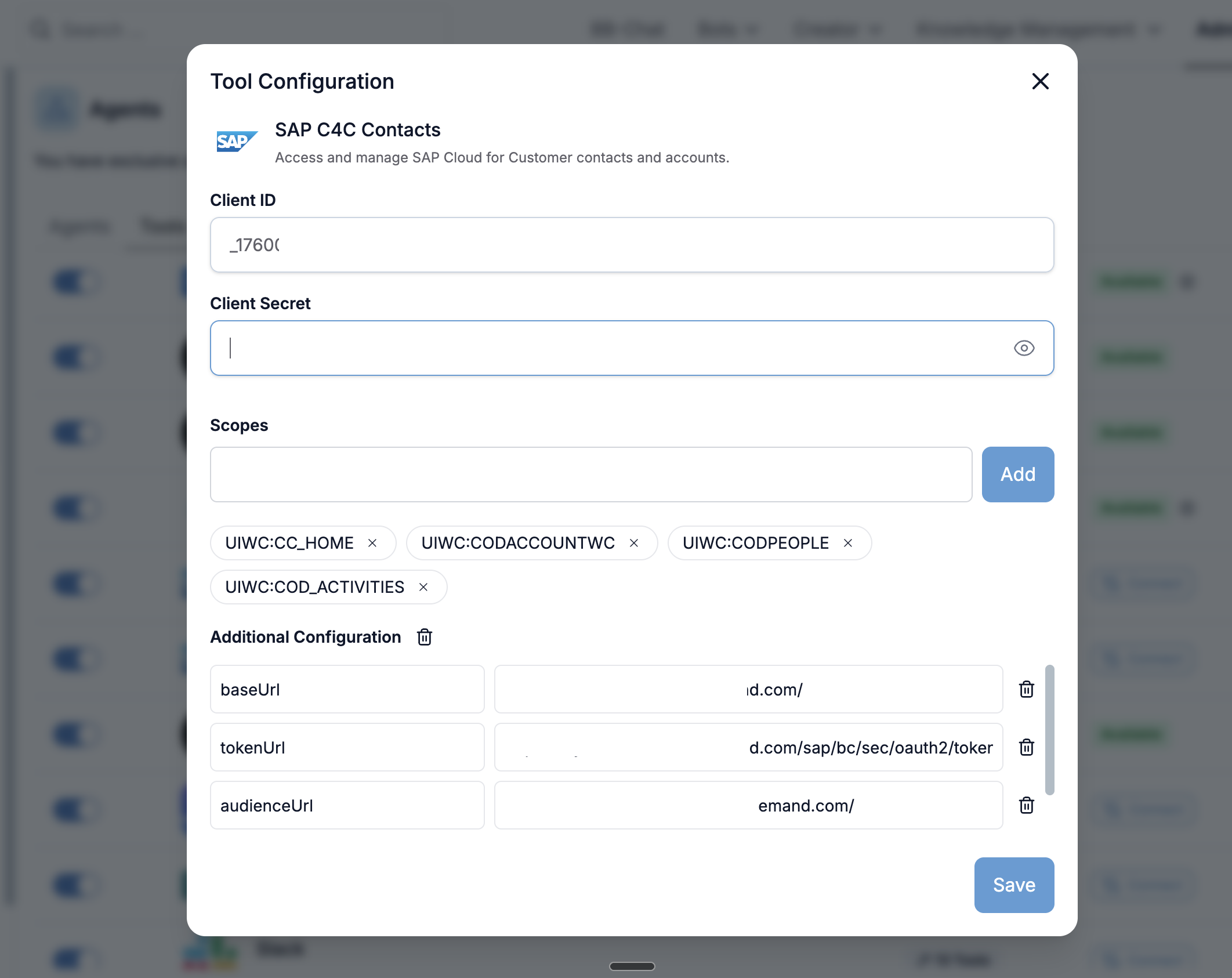
<figure><img src="/files/3Kxrhf97L8z2Gj5O86Q7" alt=""><figcaption></figcaption></figure>

**Connection Details**

* **Auth flow:** OAuth 2.0 Client Credentials *(no browser redirect, no end-user consent)*
* **Redirect URL on the SAP side:** *not required*
* **Tenant URL:** `https://my{tenant-id}.crm.ondemand.com`
* **Credentials you'll paste into Blockbrain:**
  * **Tenant URL / Host**
  * **Client ID**
  * **Client Secret**
* **Behind the scenes:** Blockbrain (via Nango) issues a server-to-server `client_credentials` token request to `https://my{tenant-id}.crm.ondemand.com/sap/bc/sec/oauth2/token` and stores the resulting access token; tokens are refreshed automatically as they expire

**Configuration Steps**

1. **Access Agent Settings:**
   * Navigate to your Blockbrain admin panel
   * Go to **Admin** > **Agents** > **Tools**
   * Find **SAP C4C Tools** (or **SAP Tools**) and enable the toggle switch `[TODO confirm exact UI label]`
   * Click **Install** (or the gear icon for configuration)
2. **Enter the SAP C4C connection details:**
   * **Tenant URL / Host:** paste your C4C base URL, e.g. `https://my300001.crm.ondemand.com` `[TODO confirm field name in Botticelli]`
   * **Client ID:** paste the Client ID from the C4C OAuth 2.0 Client Registration screen
   * **Client Secret:** paste the Client Secret from C4C (use the eye icon to toggle visibility)
3. **Additional Configuration (Optional):**
   * Configure custom key-value pairs for specific organisational requirements (e.g. a non-default OData service path if your tenant uses a tailored extension service) `[TODO confirm whether the agent supports custom OData service paths]`
   * Set up any org-specific record-access restrictions as needed
4. **Save Configuration:**
   * Click **Save** to apply all settings
   * Wait for the confirmation message

> **No "Connect" pop-up window.** Unlike the Outlook / Salesforce / Google flows, you will not see a browser pop-up bouncing you to a SAP login screen. The first time the agent calls C4C, Blockbrain exchanges the client credentials for an access token in the background and proceeds.

**SAML 2.0 Bearer Assertion (Alternative)**

If your C4C tenant is configured for OAuth 2.0 with the **SAML 2.0 Bearer Assertion** grant type instead of Client Credentials, the setup mirrors how Blockbrain handles SAP SuccessFactors today:

1. In C4C, register your OAuth 2.0 Client with **Issue Settings → Method = SAML 2.0 Bearer Assertion** and upload the X.509 public certificate paired with the private key you'll use to sign assertions
2. Generate a 2048-bit RSA private key and self-signed X.509 certificate locally and register the certificate with the OAuth Client:

   ```
   openssl req -new -newkey rsa:2048 -nodes -keyout private.pem -out request.csr
   openssl req -new -x509 -key private.pem -out cert.pem -days 3650
   ```
3. For each authenticating user, build a Base64-encoded SAML 2.0 Bearer Assertion signed with `private.pem`. The assertion's `recipient` must be `https://my{tenant-id}.crm.ondemand.com/sap/bc/sec/oauth2/token` and the assertion must reference the C4C **business user** that the agent should act as
4. In Blockbrain, paste:
   * **Tenant URL / Host**
   * **Client ID**
   * **Company / Business User ID** `[TODO confirm exact field name]`
   * **SAML 2.0 Bearer Assertion** (Base64)
5. Save. Blockbrain (via Nango's two-step flow) POSTs the assertion to the C4C token endpoint with `grant_type=urn:ietf:params:oauth:grant-type:saml2-bearer` and stores the resulting token

> **When to choose this flow:** Pick SAML 2.0 Bearer when (a) you must scope agent actions to a specific named business user rather than a single technical user, or (b) your IT policy disallows the Client Credentials grant for SAP integrations. Otherwise Client Credentials is simpler to operate.

#### Testing the SAP C4C Agent

**Verification Steps**

**Connection Test:**

* Use Blockbrain's built-in connection testing tool
* Verify that the first token request to `/sap/bc/sec/oauth2/token` succeeds and a token is stored

**Record Access:**

* Have a test user prompt the agent to list records for a known entity (e.g. **Accounts**, **Contacts**, or **Opportunities**)
* Verify record content retrieval (e.g. reading the fields of a specific lead or ticket)

**Create Functionality:**

* Test creating a new record in a safe/test entity (e.g. a sandbox **Lead**)
* Verify that read-only fields are excluded from the payload
* Confirm the new record appears in C4C

**Update Functionality:**

* Test updating an existing record field (e.g. an opportunity stage or contact phone number)
* Confirm the change is reflected directly in C4C

**Entity Discovery:**

* Ask Blockbrain to identify an entity by a label (e.g. "Service Tickets" or "Sales Quotes")
* Verify the agent correctly resolves it to the C4C OData collection name (e.g. `ServiceRequestCollection`, `SalesQuoteCollection`)
* Confirm the resolved name is used in a subsequent operation

#### Common Integration Use Cases

**Lead & Contact Management**

* **Lead Search**: Find and filter leads by name, status, account, qualification level, or creation date
* **Contact Lookup**: Retrieve contact details for any account or individual
* **Record Creation**: Add new leads or contacts directly from a Blockbrain conversation

**Account & Opportunity Management**

* **Account Research**: Pull full account details, related contacts, and open opportunities
* **Pipeline Tracking**: List opportunities by sales phase, expected close date, or owner
* **Deal Updates**: Update opportunity sales phases, expected revenue, or close dates without leaving the chat

**Service & Ticketing**

* **Ticket Triage**: Retrieve open service tickets by priority, processor, or service category
* **Ticket Updates**: Change ticket status, add notes, or reassign the responsible processor from chat
* **Activity Logging**: Create appointments, phone-call records, or tasks tied to accounts or tickets

**CRM Data Analysis**

* **Record Summaries**: Get structured summaries of any C4C record
* **Field Extraction**: Extract specific field values across multiple records
* **Custom Entity Support**: Query and manage tenant-specific extension entities (KUT / SDK) using plain-language descriptions

#### Troubleshooting

**Authentication Issues**

| Symptom                                                 | Cause                                                     | Solution                                                                                                                                                    |
| ------------------------------------------------------- | --------------------------------------------------------- | ----------------------------------------------------------------------------------------------------------------------------------------------------------- |
| `invalid_client` on the very first request              | Wrong Client ID or Client Secret                          | Re-copy the Client ID and Client Secret from the C4C OAuth 2.0 Client Registration screen. Remember the secret is only shown once — re-issue if you lost it |
| `unsupported_grant_type`                                | OAuth Client created with the wrong issue method          | In C4C, edit the OAuth 2.0 Client and set **Issue Settings → Method = Client Credentials** (or **SAML 2.0 Bearer Assertion** for the alt flow)              |
| `invalid_request: missing user binding`                 | The OAuth Client is not bound to a business user          | In C4C, open the OAuth Client and set the **Binding → User** to a valid technical/communication user                                                        |
| Connection test fails immediately after client creation | C4C propagation delay                                     | Wait a few minutes after creating or editing the OAuth Client, then retry `[TODO confirm typical delay]`                                                    |
| `403 Forbidden` on every request despite valid token    | The bound technical user lacks the required business role | In C4C, edit the technical user's **Business Role** and assign the work-centre views the agent needs (Accounts, Opportunities, Service, etc.)               |
| `401 Unauthorized` after working fine for a while       | OAuth Client secret rotated or expired                    | Regenerate the Client Secret in C4C, then update the Client Secret in Blockbrain and click **Save**                                                         |

**Why isn't there a browser pop-up?**

Unlike Salesforce or Outlook, SAP C4C uses a server-to-server token grant. **There is no OAuth consent screen, no user redirect, and no `https://nango.theblockbrain.ai/oauth/callback` whitelisting on the SAP side.** If you are looking for a "Sign in with SAP" button after pressing **Save**, that's expected behaviour — the connection is already live as soon as the first token request succeeds.

**Record Access Errors**

| Symptom                               | Cause                                           | Solution                                                                                                                              |
| ------------------------------------- | ----------------------------------------------- | ------------------------------------------------------------------------------------------------------------------------------------- |
| `403 Forbidden` / no records returned | Bound user lacks business role / access context | Confirm the bound technical user can view the record directly in the C4C UI; check their **business role** and **access restriction** |
| Entity not visible                    | OData service not enabled                       | Verify the relevant OData service is published in **Communication Arrangements** for the tenant                                       |
| Intermittent access issues            | Wrong OAuth Client                              | Verify the OAuth Client used by the agent is bound to the correct technical user                                                      |
| `400 Bad Request` on filter           | Wrong OData operator                            | C4C OData v2 only supports a subset of OData filter operators — simplify the filter and retry                                         |

**Field & Write Errors**

| Symptom                              | Cause                              | Solution                                                                                                     |
| ------------------------------------ | ---------------------------------- | ------------------------------------------------------------------------------------------------------------ |
| Record creates with missing fields   | Fields are read-only or determined | Blockbrain skips read-only fields — check field editability in C4C **Adaptation** mode for the relevant view |
| `No creatable fields provided` error | All supplied fields are read-only  | Supply at least one writable field; check the entity's `$metadata` for `sap:creatable="true"` annotations    |
| Update fails silently                | Field-level authorisation block    | Confirm the bound user's business role permits editing the target field on that entity                       |
| `Mandatory field missing` on create  | Required field not provided        | Inspect the `$metadata` to identify all `Nullable="false"` properties on the entity and supply them          |

**SAML 2.0 Bearer Assertion-Specific Issues**

*(Only applies if you chose the SAML 2.0 Bearer Assertion flow.)*

| Symptom                                   | Cause                                                                                   | Solution                                                                                                         |
| ----------------------------------------- | --------------------------------------------------------------------------------------- | ---------------------------------------------------------------------------------------------------------------- |
| `invalid_assertion` / `invalid_signature` | Assertion was not signed with the X.509 private key registered against the OAuth Client | Re-sign the assertion with the correct `private.pem`; confirm the `cert.pem` registered in C4C matches that key  |
| `assertion expired`                       | Assertion's `NotOnOrAfter` is in the past                                               | Regenerate the assertion immediately before pasting it into Blockbrain — assertion lifetimes are short by design |
| `subject not found`                       | The `NameID` in the assertion does not match any C4C business user                      | Check the `nameIdentifier` in your assertion-generation script — it must be a valid C4C user ID                  |

#### Security and Compliance

**Data Protection**

* **Record Security**: All SAP C4C data is handled according to Blockbrain's security policies
* **Field Privacy**: Field-level access respects the C4C business role and access-restriction model
* **Token Security**: OAuth tokens are securely stored and encrypted in Nango — credentials are never exposed to end users
* **Secret Hygiene**: The C4C OAuth Client Secret is stored encrypted; if it is ever leaked, rotate it in C4C and re-paste into Blockbrain

**Compliance Considerations**

* **GDPR Compliance**: CRM record access and processing follows GDPR requirements
* **Data Retention**: No SAP C4C record content is permanently stored by Blockbrain — data is processed in real-time
* **Audit Logging**: All SAP C4C Agent activities are logged for compliance reporting on the Blockbrain side. **In addition, every OData call appears in the C4C audit log under the bound technical/communication user** — your C4C admin can trace every action the agent takes back to that single principal

**Access Control**

* **Technical-user model (Client Credentials):** every agent call inherits the **business role** and **access restriction** of the technical user bound to the OAuth Client — no privilege escalation is possible. Pick the user's role carefully — it sets a hard ceiling on what the agent can ever do
* **Per-user model (SAML 2.0 Bearer Assertion):** every agent call is scoped to the named business user identified in the assertion — best for tenants that need per-user accountability in audit logs
* **Entity-Level Security**: Respects C4C work-centre and view assignments
* **Field-Level Security**: Read-only and access-restricted fields are automatically identified and excluded from write operations

#### Next Steps

After successful SAP C4C Agent configuration:

1. **User Training**: Share the SAP C4C Agent user guide with end users
2. **Permission Review**: Regularly audit the business role of the bound technical user (Client Credentials) or the IdP-issued certificates (SAML Bearer) to ensure they remain appropriate
3. **Integration Monitoring**: Monitor the OAuth connection for ongoing functionality — particularly Client Secret expiry and X.509 certificate validity
4. **Feature Adoption**: Encourage teams to leverage lead management, pipeline tracking, ticket triage, and custom-entity capabilities

#### Support and Resources

For assistance with SAP C4C Agent configuration:

* **Blockbrain Support**: Contact your Customer Success Manager for feature-specific help
* **SAP Documentation**: Reference the [SAP Cloud for Customer OData API documentation](https://help.sap.com/docs/SAP_CLOUD_FOR_CUSTOMER) and the SAP C4C **OAuth 2.0 Client Registration** help topic `[TODO replace with the current C4C OAuth help link]` for detailed permission information
* **SAP C4C Administrators**: For tenant-level OAuth client policies, communication-user provisioning, and business-role assignment, consult your SAP C4C Administrator


---

# Agent Instructions: Querying This Documentation

If you need additional information that is not directly available in this page, you can query the documentation dynamically by asking a question.

Perform an HTTP GET request on the current page URL with the `ask` query parameter:

```
GET https://docs.blockbrain.ai/for-admins/agents/sap-c4c-agent.md?ask=<question>
```

The question should be specific, self-contained, and written in natural language.
The response will contain a direct answer to the question and relevant excerpts and sources from the documentation.

Use this mechanism when the answer is not explicitly present in the current page, you need clarification or additional context, or you want to retrieve related documentation sections.